HP12c+ Financial Calculator Emulator
Supports all HP12c calculator functions, including programming, and adds new financial functions (+).

Keyboard use
The Alt+Q combination provides direct access to the calculator extension.
If it does not work automatically after installation, go to “Extensions > Keyboard shortcuts > Open the HP12c calculator” and use the Alt+Q combination.
It can be used in two sizes, large or small. Switch between them with f + or f —. This preference is stored for future use.
All entered values are retained in memory for future use of the calculator.
Some keyboard keys make the emulator easier to use in everyday operation:
ENTERCLx (clear x)g − or ←CHS (change sign)EEXf, g, STO and RCL.n, i, PV, PMT, FV.%, %T and Δ%.yx1/xx<>yR↓Σ+ON, switches between the decimal point (.) and the comma (,) used in European notation.R/SSSTTVM12c Logo
New functions added
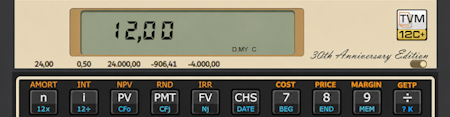
If the selector in the lower-right corner of the display area or the
L key is activated, the values of the financial variables
n, i, PV, PMT, FV,
%GV and AV can be displayed above their corresponding
keys for greater convenience.
Calculation of variable annuities in geometric and arithmetic progression
has been implemented, together with the constant annuities supported by the HP12c. When
%GV = 0 and AV = 0, TVM12c+ treats the cash flow as a
constant annuity.
General operation is the same: enter the values of the known variables and press the desired variable so that the calculator computes its value. The cash-flow sign convention must also be observed.
If %GV ≠ 0 and AV = 0, calculations are performed for a
variable annuity in geometric progression, with growth rate %GV,
applied over the periods specified by n and taking the remaining financial variables
into account. The value of PMT corresponds to the first term of the annuity.
If \(q=\%GV/100\), \(i=i\%/100\), and \(\mu\) is defined as an indicator of the payment timing,
the financial equation used is:
\[ 0 = PV + PMT\,(1+i\mu)\, \frac{1-\left(\displaystyle\frac{1+q}{1+i}\right)^n}{i-q} + \displaystyle\frac{FV}{(1+i)^n} \]
The parameter \(\mu\) makes it possible to handle both ordinary annuities and annuities due within the same expression. If \(\mu=0\), the annuity is ordinary (END) and \((1+i\mu)=1\), so this factor does not change the result. If \(\mu=1\), the annuity is due (BEGIN) and the factor becomes \((1+i)\) shifting every payment one period toward the present.
For the special case \(i=q\), the geometric-annuity factor is replaced by \[ (1+i\mu)\,\frac{n}{1+i} \]
Example. Given a variable annuity in geometric progression with a first payment of $10\:000$, increasing by $20\%$ annually, a duration of $15$ years, and an effective interest rate of $6\%$, determine its present value and future value.
After clearing the financial registers, in ordinary-annuity mode
(END, \(\mu=0\)) and observing the cash-flow sign convention, enter
10000 H PMT, 20 %GV, 15 n and 6 i.
The result is:
\[ PV = 387.772,27 \] \[ FV = 929.318,81 \]
If %GV = 0 and AV ≠ 0, calculations are performed for a
variable annuity in arithmetic progression, with increment AV, a first
payment equal to PMT, and n periods. Under the cash-flow sign convention,
for example, if PMT = -500 and the amount increases by 25 each period, enter
AV = -25. Defining \(i=i\%/100\), \(v=(1+i)^{-1}\),
\(a_{\overline{n}|i}=\dfrac{1-v^n}{i}\), and \(\mu\) as an indicator of the payment timing,
the financial equation used is:
\[ 0 = PV + (1+i\mu)\left[ PMT\,a_{\overline{n}|i} + AV\,\displaystyle\frac{a_{\overline{n}|i}-n v^n}{i} \right] + FV\,v^n \]
The parameter \(\mu\) makes it possible to handle both ordinary annuities and annuities due within the same expression. If \(\mu=0\), the annuity is ordinary (END) and \(1+i\mu=1\), so this factor does not change the result. If \(\mu=1\), the annuity is due (BEGIN) and the factor becomes \(1+i\), shifting every payment one period toward the present.
Example. Determine the present value of an annual variable annuity in arithmetic progression, with a first payment of $10\:000$, increasing by $2\:000$ annually, a duration of $20$ years, and an interest rate of $5\%$.
After clearing the financial registers, in ordinary-annuity mode
(END, \(\mu=0\)) and observing the cash-flow sign convention, enter
10000 H PMT, 2000 H AV, 20 n
and 5 i. Pressing PV gives:
\[ PV = 321.598,93 \]
If %GV ≠ 0 and AV ≠ 0, the calculator displays Error 5.
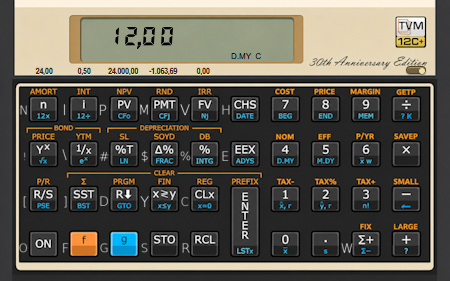
g ÷g ÷.f 0f +f —f ×SAVEP = Saves a program to disk.f ÷GETP = Loads a program saved on disk into the calculator.f number of decimal places is now f Σ+ [or W key] number of decimal places.
f . still selects scientific notation.
f 1 = TAX−f 2 = TAX%f 3 = TAX+f 4 = NOMf 5 = EFFf 6 = P/YRf 7 = COSTf 8 = PRICEf 9 = MARGINAn HP12c calculator quick reference guide is available in PDF format.
Note
This emulator is provided as is. Use it with caution. It is not affiliated with Hewlett-Packard or HP Inc. "HP" and "HP12c" are registered trademarks of HP Inc. This software is an independent emulation created as a hobby for educational or personal use.